Kubernetes 환경에서 기본적으로 제공하는 CPU, Memory 메트릭이 아닌, 애플리케이션 고유의 메트릭(Custom Metric)을 기반으로 HPA(Horizontal Pod Autoscaler)를 구성하는 방법을 정리한다. 본 예제에서는 Apache HTTP Server(httpd)의 busy_workers 메트릭을 사용하여 트래픽 증가 시 자동으로 파드를 스케일 아웃하는 과정을 다룬다.
테스트한 전체 구조는 다음과 같다.
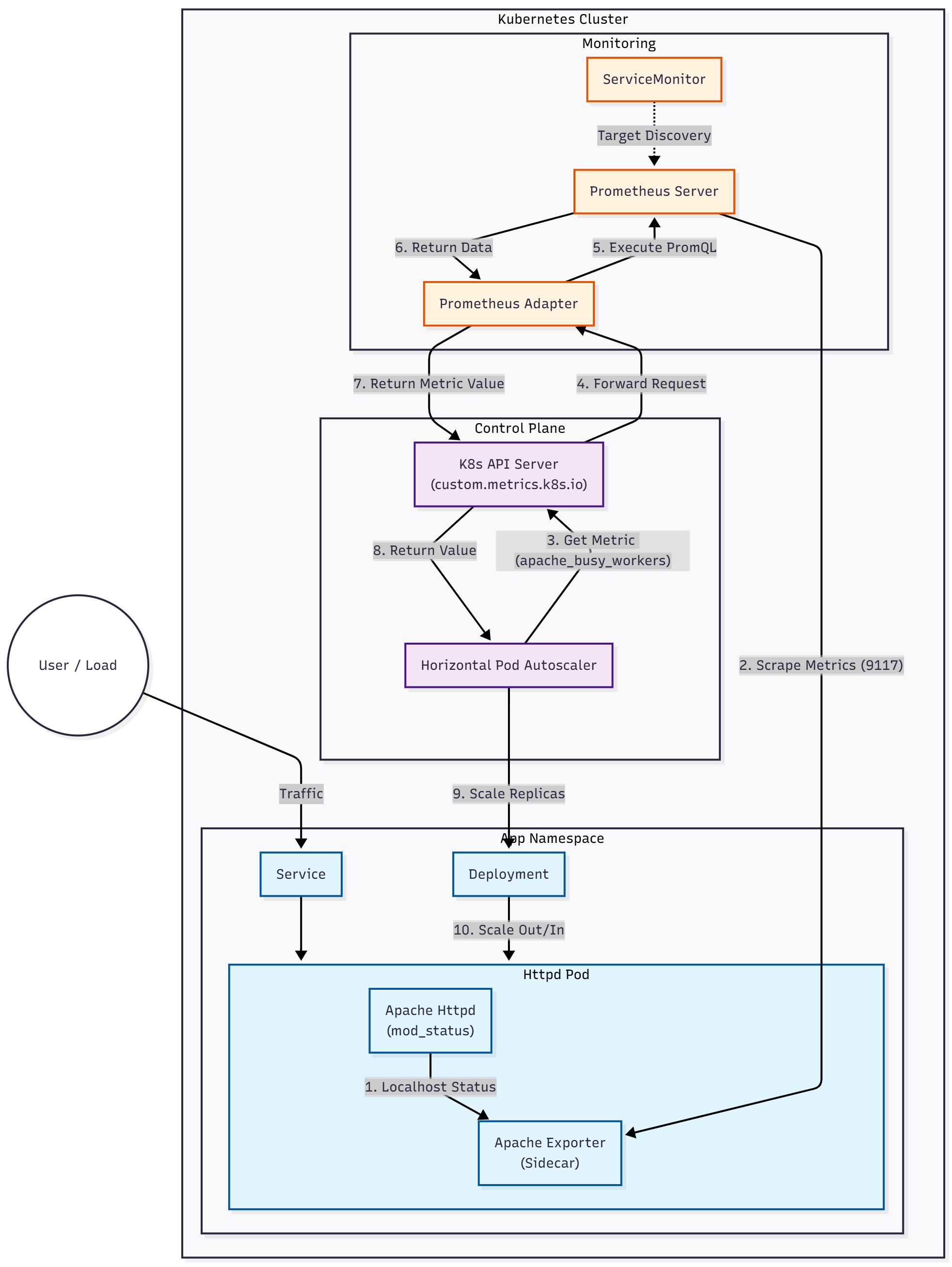
1. Prometheus Adapter 설치
Kubernetes의 HPA가 Prometheus의 메트릭을 이해할 수 있도록 prometheus-adapter를 설치한다. 이를 통해 Prometheus 쿼리 결과를 Kubernetes Custom Metrics API로 변환할 수 있다.
먼저 Helm 리포지토리를 추가하고 차트를 가져온다.
helm repo add prometheus-community https://prometheus-community.github.io/helm-charts
helm fetch prometheus-community/prometheus-adapter
tar -xzf prometheus-adapter-*
cd prometheus-adapter기본적인 Prometheus 연결 설정을 담은 설정 파일을 작성한다.
customvalues.yaml
prometheus:
url: http://monitoring-kube-prometheus-prometheus.prometheus.svcHelm을 사용하여 네임스페이스 생성과 함께 설치를 진행한다.
helm install prometheus-adapter . -f customvalues.yaml -n prometheus --create-namespace설치가 완료되면 잠시 후 API 등록 여부를 확인할 수 있다.
kubectl get --raw /apis/custom.metrics.k8s.io/v1beta1
2. 타겟 애플리케이션(httpd) 배포
Apache HTTP Server를 배포하고, 메트릭을 노출하기 위한 설정을 진행한다.
2.1 ConfigMap 생성
Apache의 mod_status 모듈을 활성화하여 서버 상태 정보를 노출하도록 설정한다. ExtendedStatus On 설정을 통해 상세 메트릭 수집이 가능하도록 한다.
apiVersion: v1
kind: ConfigMap
metadata:
  name: httpd-config
  namespace: default
data:
  status.conf: |
    LoadModule status_module modules/mod_status.so

    <Location "/server-status">
        SetHandler server-status
        Require all granted
    </Location>

ExtendedStatus On이후 해당 ConfigMap을 마운트하는 Deployment와 Service를 생성한다. 또한 메트릭 수집을 위해 apache-exporter 사이드카 컨테이너를 포함하거나, apache-exporter가 접근 가능한 구조로 구성해야 한다.
deployment.yaml
apiVersion: apps/v1
kind: Deployment
metadata:
  name: httpd-deployment
  namespace: default
spec:
  selector:
    matchLabels:
      app: httpd
  replicas: 1
  template:
    metadata:
      labels:
        app: httpd
      annotations:
        # Prometheus가 이 Pod를 스크랩하도록 설정 (ServiceMonitor를 안 쓰는 경우 필수)
        prometheus.io/scrape: "true"
        prometheus.io/port: "9117"
        prometheus.io/path: "/metrics"
    spec:
      containers:
      # 1. Apache Web Server
      - name: httpd
        image: httpd:2.4
        ports:
        - containerPort: 80
        volumeMounts:
        - name: apache-config-volume
          mountPath: /usr/local/apache2/conf/extra/httpd-status.conf
          subPath: status.conf
        # httpd.conf 맨 마지막에 우리가 만든 status.conf를 include 하도록 설정
        lifecycle:
          postStart:
            exec:
              command: ["/bin/sh", "-c", "echo 'Include conf/extra/httpd-status.conf' >> /usr/local/apache2/conf/httpd.conf && httpd -k restart"]
        resources:
          requests:
            cpu: 100m
            memory: 128Mi

      # 2. Apache Exporter (Sidecar)
      - name: apache-exporter
        image: bitnami/apache-exporter:latest
        args:
          - --scrape_uri=http://localhost:80/server-status/?auto
        ports:
        - containerPort: 9117 # Exporter 기본 포트
        resources:
          requests:
            cpu: 50m
            memory: 64Mi

      volumes:
      - name: apache-config-volume
        configMap:
          name: httpd-config
service.yaml
apiVersion: v1
kind: Service
metadata:
  name: httpd-service
  namespace: default
  labels:
    app: httpd
spec:
  ports:
  - port: 80
    targetPort: 80
    name: http
  - port: 9117
    targetPort: 9117
    name: metrics
  selector:
    app: httpd
구성이 완료되면 포트 포워딩을 통해 메트릭이 정상적으로 노출되는지 확인한다.
kubectl port-forward httpd-deployment-7b8f7fddb4-td2pd 9117:9117
curl http://localhost:9117/metrics
3. Prometheus Adapter 규칙 설정
Prometheus Adapter가 수집된 apache_workers 메트릭을 Kubernetes API에서 인식할 수 있는 형태(apache_busy_workers)로 변환하도록 규칙(Rules)을 정의한다. 기존 customvalues.yaml 파일을 수정하여 업그레이드를 진행한다.
customvalues.yaml
prometheus:
  url: http://monitoring-kube-prometheus-prometheus.prometheus.svc

rules:
  custom:
  - seriesQuery: 'apache_workers{state="busy"}'
    resources:
      overrides:
        namespace: {resource: "namespace"}
        pod: {resource: "pod"}
    name:
      matches: "^apache_workers$"
      as: "apache_busy_workers"
metricsQuery: 'sum(<<.Series>>{state="busy"}) by (<<.GroupBy>>)'- seriesQuery: Prometheus에서
apache_workers메트릭 중 상태가busy인 시계열 데이터를 조회한다. - resources: Prometheus 라벨을 Kubernetes 리소스(namespace, pod)와 매핑한다.
- name: 메트릭 이름을
apache_busy_workers로 변경하여 사용하기 쉽게 만든다. - metricsQuery: HPA가 메트릭을 요청할 때 실행될 실제 PromQL 쿼리를 정의한다.
설정 파일을 적용하여 prometheus-adapter 릴리즈를 업그레이드한다.
helm upgrade prometheus-adapter . -f customvalues.yaml -n prometheus
4. ServiceMonitor 생성
Prometheus가 httpd 애플리케이션의 메트릭을 수집할 수 있도록 ServiceMonitor 리소스를 생성한다.
monitor.yaml
apiVersion: monitoring.coreos.com/v1
kind: ServiceMonitor
metadata:
  name: httpd-monitor
  namespace: default
  labels:
    release: monitoring # Prometheus Operator가 감지할 수 있는 라벨 설정
spec:
  selector:
    matchLabels:
      app: httpd
  endpoints:
  - port: metrics # Service 포트 이름
    path: /metrics
    interval: 15s
  namespaceSelector:
    matchNames:
    - default
5. Custom Metric 조회 확인
설정이 올바르게 적용되었다면, Kubernetes API를 통해 커스텀 메트릭 값을 직접 조회할 수 있다.
kubectl get --raw "/apis/custom.metrics.k8s.io/v1beta1/namespaces/default/pods/*/apache_busy_workers"출력 예시는 다음과 같다. value 필드에 현재 메트릭 값이 표시된다.
{"kind":"MetricValueList","apiVersion":"custom.metrics.k8s.io/v1beta1","metadata":{},"items":[{"describedObject":{"kind":"Pod","namespace":"default","name":"httpd-deployment-7b8f7fddb4-td2pd","apiVersion":"/v1"},"metricName":"apache_busy_workers","timestamp":"2025-11-16T12:41:37Z","value":"1","selector":null}]}
6. HPA(Horizontal Pod Autoscaler) 설정
이제 확인된 커스텀 메트릭 apache_busy_workers를 기준으로 동작하는 HPA를 생성한다. 파드당 평균 Busy Worker 수가 5개를 초과하면 스케일 아웃이 발생하도록 설정한다.
hpa-httpd.yaml
apiVersion: autoscaling/v2
kind: HorizontalPodAutoscaler
metadata:
  name: httpd-hpa
  namespace: default
spec:
  scaleTargetRef:
    apiVersion: apps/v1
    kind: Deployment
    name: httpd-deployment
  minReplicas: 1
  maxReplicas: 10
  metrics:
  - type: Pods
    pods:
      metric:
        name: apache_busy_workers
      target:
        type: AverageValue
        averageValue: 5
7. 부하 테스트 및 오토스케일링 검증
HPA의 동작을 검증하기 위해 apache-bench(ab) 도구를 사용하여 부하를 생성한다. 두 개의 터미널에서 동시에 부하를 발생시켰다.
kubectl run -i --tty load-generator1 --rm --image=httpd:2.4 --restart=Never -- /bin/sh -c "ab -n 10000000 -c 100 http://httpd-service/"
kubectl run -i --tty load-generator2 --rm --image=httpd:2.4 --restart=Never -- /bin/sh -c "ab -n 10000000 -c 100 http://httpd-service/"별도의 터미널에서 HPA 상태를 관찰한다.
kubectl get hpa httpd-hpa -w로그를 통해 부하가 증가함에 따라 TARGETS 수치가 상승하고, 이에 맞춰 REPLICAS가 1개에서 4개까지 증가하는 것을 확인할 수 있다. 부하가 제거되면 다시 스케일 인(Scale In) 동작이 수행된다.
NAME        REFERENCE                      TARGETS   MINPODS   MAXPODS   REPLICAS   AGE
httpd-hpa   Deployment/httpd-deployment    1/5       1         10        1          60m
httpd-hpa   Deployment/httpd-deployment    20/5      1         10        1          63m
httpd-hpa   Deployment/httpd-deployment    2/5       1         10        4          63m
...
httpd-hpa   Deployment/httpd-deployment    1/5       1         10        4          68m
httpd-hpa Deployment/httpd-deployment 1/5 1 10 1 72m'Linux > K8s' 카테고리의 다른 글
| ArgoCD API를 활용한 Application 파라미터 업데이트 (0) | 2026.01.05 |
|---|---|
| Kubernetes 환경 구축 하기 (0) | 2025.08.05 |
| Spring Boot 애플리케이션을 Docker와 Kubernetes로 배포하기 (1) | 2025.07.07 |
| ArgoCD 설치(minikube) (0) | 2025.04.28 |
| k8s host volume mount test (0) | 2024.04.18 |